Quick Answer
In general, fold-out labels and multi-layer labels both add information without requiring a larger primary label, but they are not interchangeable in every project. For more reading space, choose a fold-out or booklet-style label when the main requirement is to provide more reading space, such as multilingual instructions, product information, usage directions or regulatory text. For a defined reveal area, choose a multi-layer or peel-and-reveal structure when the label needs a defined top layer and underlying information, a compact reveal area, or a more controlled interaction with the package. Ultimately, the right choice depends on more than the number of pages. Before production, confirm the package material and curvature, label dimensions, content sequence, opening and resealing method, adhesive requirements, application method, roll direction and artwork structure. A label that works on a flat sample may need a different construction for a small-radius bottle or an automated labeling line. For food packages, consult the FDA Food Labeling Guide for applicable labeling requirements.
Why Extended-Content Labels Need More Planning
First, a standard label normally has one main printable face. This works well when the package only needs a brand name, product name, net contents and a limited amount of supporting information. The available area becomes difficult to manage when the same package must also carry several languages, directions, warnings, ingredients, product stories, usage information or campaign details. However, increasing the outside dimensions is not always practical. As a result, a larger label may cover too much of the package, interfere with the front-panel design or create application problems around a curved container. In practice, an extended-content label creates additional information space while keeping the visible footprint more controlled. Therefore, the first question should not be, “Which label looks more premium?” A better question is:
What information must the customer read, how will the label be opened, and what must remain visible before and after opening?
With that answer, you can determine whether a fold-out format, a booklet-style structure, a peel-and-reveal construction or another multi-layer solution is more suitable.
What Are Fold-Out Labels?
A fold-out label adds printable content through a folded section. Depending on the construction, the folded panel may open like a leaflet or booklet and may be designed to close again after reading.
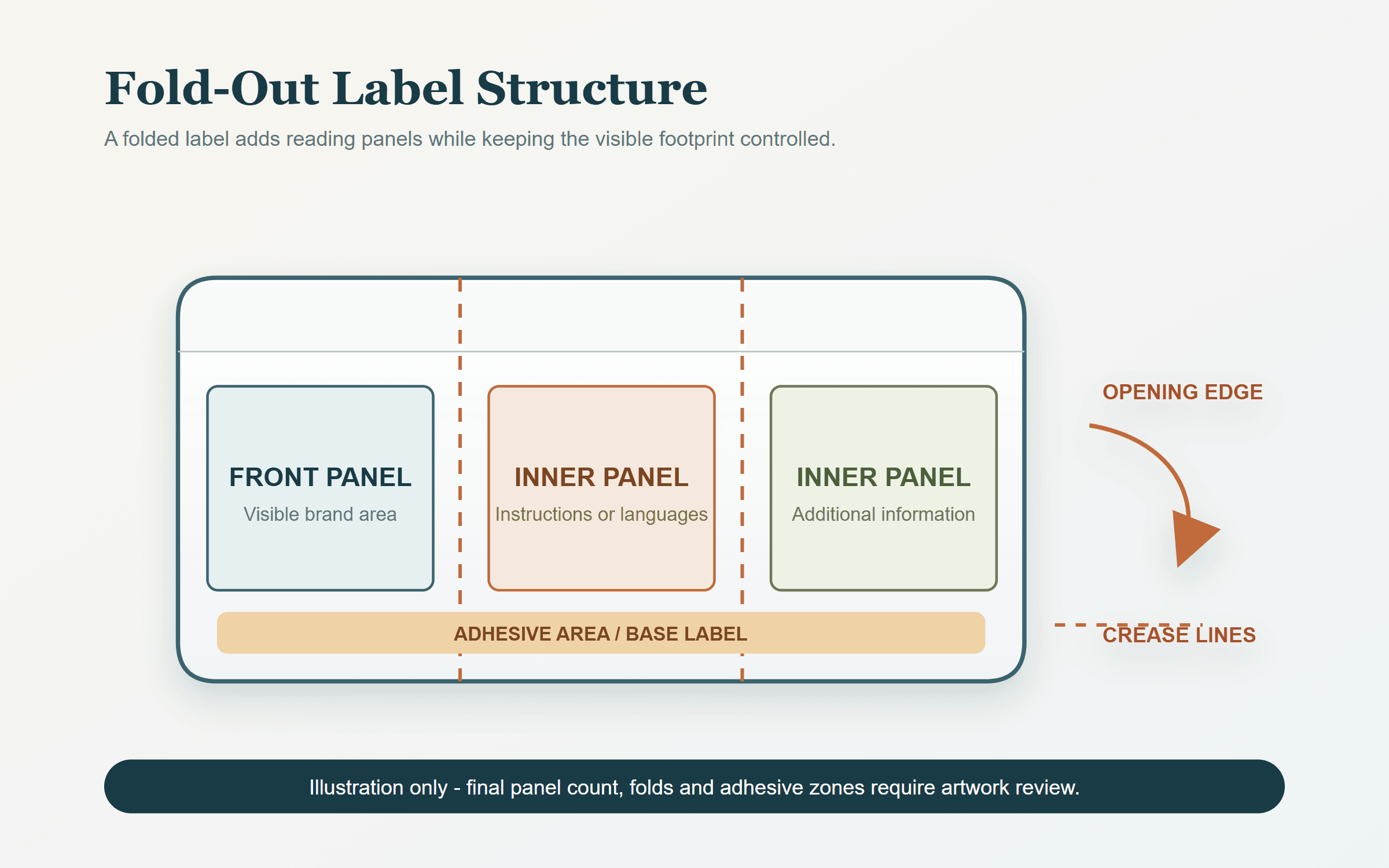
Common uses include:
- Multilingual packaging information
- Product instructions and directions for use
- Brand stories and serving suggestions
- Product information for export markets
- Information that would otherwise require a separate insert
- Small containers that need more copy than the visible panel can hold
A fold-out label can be useful when the reading sequence is important. folded-label prepress and sampling guidance helps confirm the artwork before production. The artwork can be organized as a front panel, opening panel and inner pages, but the production team must check the final sequence against the actual fold and opening direction. Keep text, barcodes, legal copy and illustrations off folds and cut edges until the production team confirms the layout. Some booklet-style labels support repeated opening and closing. Other constructions provide to provide additional information with a simpler opening action. Confirm the exact construction from the artwork, the desired user experience and the package application method rather than assumed from the product name alone.
What Are Multi-Layer Labels?
Multi-layer labels use more than one label face or material layer to create additional information space or a reveal function. Depending on the construction, users may peel back a top layer, reveal an underlying panel or interact with a compact information area while the main label remains attached to the package.
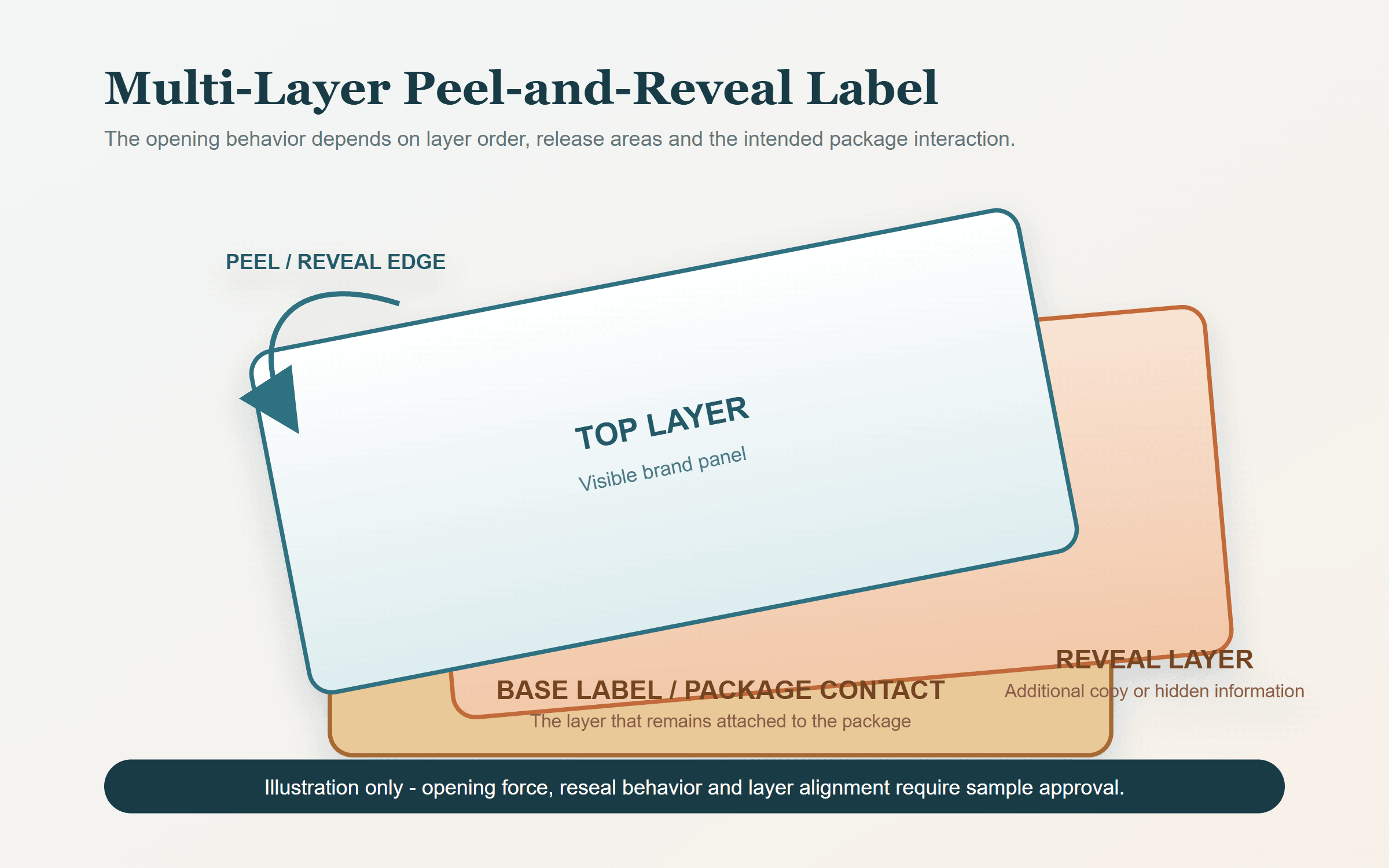
For example, possible applications include:
- Hidden or extended product information
- Multilingual copy on a compact package
- Promotional or campaign content
- Variable information or serialized content
- A clear top layer over a printed or colored package surface
- Information that needs to be separated into visible and reveal sections
In contrast, a peel-and-reveal structure is different from a fold-out leaflet even when both are used to add content. A fold-out label is organized around a fold and an opening sequence. A multi-layer label is organized around layers, release points, adhesive areas and the way the user reveals the information. For transparent packaging, a clear multi-layer construction brands may consider when they want a more integrated appearance. The printed layers, white ink coverage, material clarity and bottle color all affect the final result, so teams should check the appearance with a physical or production-representative sample.
Fold-Out Labels vs. Multi-Layer Labels: Key Differences
| Decision factor | Fold-out labels | Multi-layer labels |
|---|---|---|
| Main purpose | Add readable panels through folding | Add a reveal or layered information area |
| Content structure | Panels or pages arranged around folds | Top and underlying layers arranged around reveal points |
| Reading experience | Open, unfold and read | Peel, reveal or separate layers as designed |
| Best starting point | Multilingual copy, instructions and longer text | Compact information, hidden copy or layered interaction |
| Artwork focus | Page order, fold lines, safe zones and opening direction | Layer order, reveal position, adhesive areas and print visibility |
| Application concerns | Fold thickness, curvature and closing behavior | Layer adhesion, release behavior and top-layer alignment |
| Sample review | Check folding sequence and content readability | Check opening force, layer alignment and reclosure behavior |
As a result, this table is a starting point, not a substitute for a construction review. The same product may be possible in more than one format, but the quote, tooling, artwork preparation and application requirements can differ.
Which Format Should You Choose?
Choose a fold-out label when content volume is the main problem
In practice, a fold-out or booklet-style label is often a logical option when the package must carry several blocks of text. This may include multiple languages, instructions, preparation information or a product story. Before selecting this format, check:
- How many languages are required?
- Does the content have a fixed reading order?
- Must the label be opened and closed repeatedly?
- Is the label applied to a flat panel or a curved container?
- Will the folded section remain within the package outline?
- Does the package use hand application or an automated labeling line?
As the number of panels grows, the artwork map becomes more important. The outer face, inner face, adhesive area and fold positions Identify them clearly before production.
Choose a multi-layer label when the reveal function is important
In contrast, a multi-layer or peel-and-reveal label may be more suitable when the design needs a compact front appearance but still requires an underlying information area. It can also be considered when the client wants the user to interact with the label in a defined way. Before selecting this format, check:
- Which information must be visible before opening?
- Which information should remain underneath?
- Should the top layer be removable, resealable or only partially opened?
- Does the top layer need to align with a printed area underneath?
- Will oil, moisture, refrigeration or handling affect the opening area?
- Does the final package need to pass through an automatic labeling process?
Before production, make opening behavior part of the sample approval. A structure that is too easy to open may open during handling. A structure that is too difficult to open can frustrate the end user or damage the information layer.
The Package Surface Matters More Than the Label Name
The same label construction can behave differently on different packages. Glass, rigid plastic, flexible plastic, metal and coated surfaces often require different material and adhesive considerations. Provide the following information before requesting a quotation:
- Package material: glass, PET, HDPE, metal, tube, pouch or another substrate.
- Surface condition: smooth, textured, coated, frosted, oily or treated.
- Shape: flat panel, cylinder, tapered bottle, small-radius curve or irregular surface.
- Application area: front, back, side, lid or wraparound position.
- Application method: hand-applied, semi-automatic or automatic.
- Use environment: ambient, refrigerated, damp, oily, outdoor or chemically exposed.
- Opening requirement: fold open, peel and reveal, partial peel or resealable use.
As a result, these details help the label manufacturer evaluate the construction rather than quote from a size and artwork file alone.
Artwork Requirements for Extended-Content Labels
Extended-content labels require a more structured artwork review than a simple single-panel sticker. Show the relationship the relationship between every panel or layer.
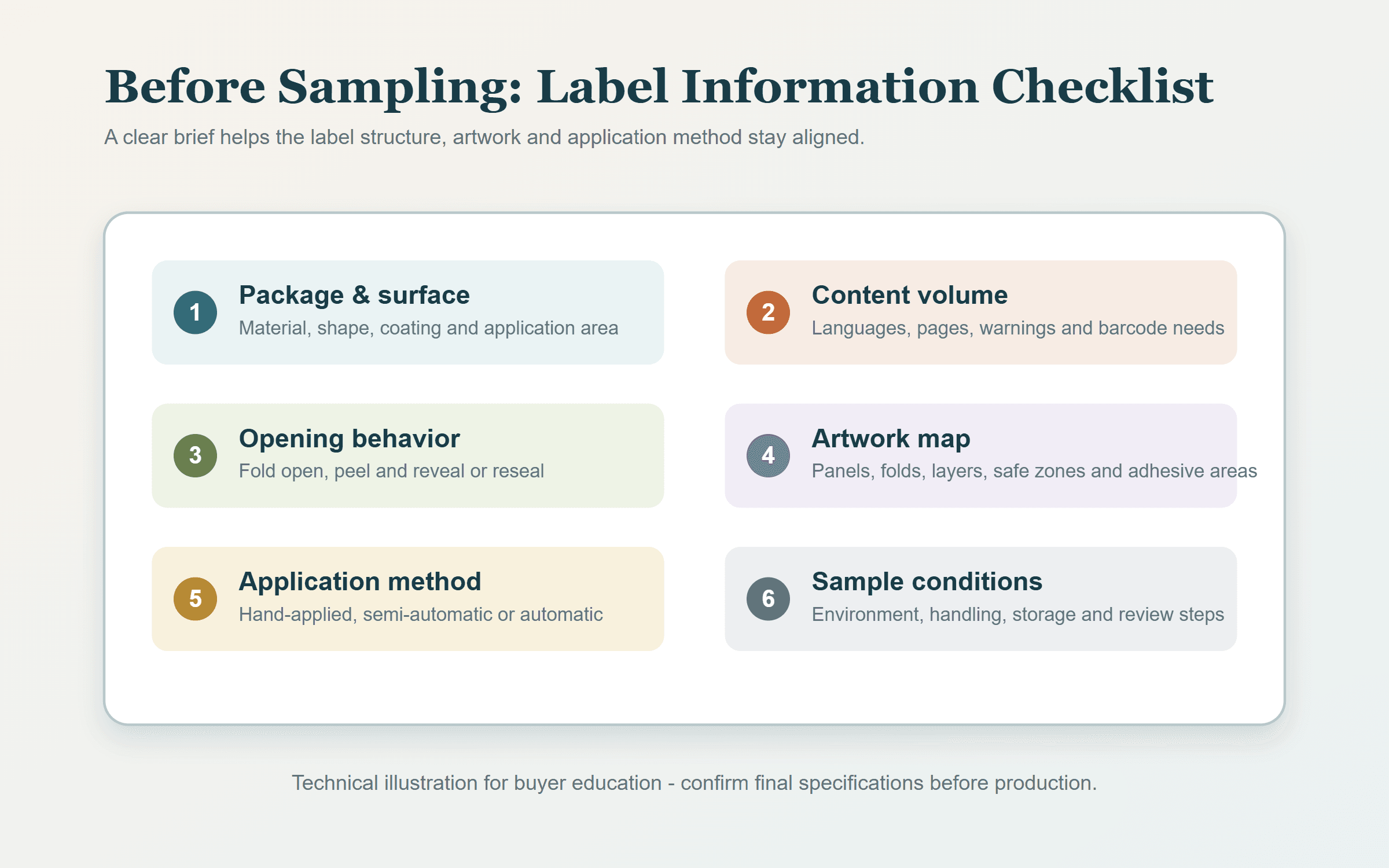
For fold-out labels
Before production, confirm:
- Finished label size;
- Opened size;
- Number of panels or pages;
- Fold positions and fold direction;
- Front and back reading order;
- Bleed and safe areas;
- Barcode position and scan direction;
- Adhesive-free or reserved areas;
- Roll direction and winding requirements;
- The position of any variable information.
For multi-layer labels
Before production, confirm:
- Top-layer artwork;
- Under-layer artwork;
- Reveal area and opening direction;
- Adhesive or release areas;
- Reseal requirement, if applicable;
- Transparency and white-ink requirements;
- Alignment between layers;
- Finished thickness and package clearance;
- Roll direction and application requirements.
For multilingual files, label each language clearly and provide a final approved copy. The printer can check production layout; however, the customer remains responsible for the final text, translations, regulatory statements and approval of the artwork.
Sample Checks Before Mass Production
Review each sample as a working package component, not only as a flat printed image.
Check 1: Content sequence
First, open or reveal the label exactly as the end user will, then confirm that the pages, panels and languages appear in the intended order.
Check 2: Legibility
Next, review small text, symbols, ingredients, instructions and barcodes at the actual finished size. Do not rely only on a large digital proof.
Check 3: Opening and closing behavior
Then, check whether the label opens at the intended point, stays attached where required and closes or reseals as specified.
Check 4: Package fit
For package fit, apply the label to the actual container or a representative sample. Check wrinkles, edge lift, fold interference and clearance around caps, seams or other labels.
Check 5: Application process
For machine application, test the roll direction, spacing, label thickness and application speed with the intended equipment or a representative setup.
Check 6: Finished appearance
Finally, check color, transparency, white ink, lamination, special finishes and the relationship between the label and package color. Record the approved size, structure, artwork version and application conditions. This reduces the risk of using a revised file or an unapproved construction for mass production.
Common Purchasing Mistakes
Treating a multi-layer label as a larger standard label
In practice, a layered construction affects the artwork, adhesive layout, thickness and application process. Quote and review it as a structure, not only as a flat size.
Sending artwork without a fold or layer map
A printer cannot safely infer the intended page order or reveal area from a complex file with unnamed panels. Mark the front, back, inner panels, fold lines and adhesive areas.
Checking the artwork only on screen
However, a label may look correct in a flat PDF but become difficult to read after folding, wrapping or revealing. Review a physical sample at the final size.
Changing the container after approval
If the package changes, a different bottle diameter, surface coating or application method can change the result. then recheck the label construction before mass production.
Focusing on the label before defining the content
Before deciding, define the number of languages, text volume, barcode requirements and user interaction the construction. Otherwise, the design may require a late structural change.
What to Send for a Quote
To evaluate a fold-out or multi-layer label, provide as much of the following as possible:
- Package photos or a physical package specification;
- Label width, height and shape;
- Package material and surface condition;
- Number of languages and approximate text volume;
- Intended label function;
- Application method;
- Required quantity and SKU list;
- Artwork file or an early layout;
- Preferred material or finish, if already known;
- Use environment and storage conditions;
- Any barcode, variable data or traceability requirements.
Even if the final artwork is not ready, a rough content outline is still useful. It allows the label manufacturer to discuss the likely structure before the design is locked.
Final Takeaway
In general, consider fold-out labels when the package needs more readable panels and a clear folding sequence. By contrast, consider multi-layer labels when the project needs a compact label with an additional reveal, underlying information or layered interaction. Ultimately, choose based on the complete packaging situation: content volume, package surface, opening behavior, application method, label dimensions and artwork readiness. Therefore, do not choose from the product name alone. When comparing options for a specific package, send the container material, label size, content volume, application method and artwork status. OnePrint can help review the production conditions and identify the information that needs to be confirmed before sampling and mass production.
FAQ
Are fold-out labels and multi-layer labels the same?
No. Fold-out labels use around folded panels or pages. Multi-layer labels are organized around separate layers, reveal areas or a peel-and-reveal function. Some projects may be possible in more than one format, but the structure and application requirements are different.
Can extended-content labels be used on curved bottles?
Yes, they may suit curved packages, but the result depends on the bottle radius, label dimensions, material, adhesive, fold or layer construction and application method. Test the label on the actual package or a representative sample before mass production.
Can these labels be used for multiple languages?
Yes, brands often consider extended-content structures when a package needs more than one language. The final number of languages, content length and page or layer arrangement should be confirmed before the artwork is finalized.
Can fold-out or multi-layer labels be applied by machine?
Suppliers can provide some constructions in roll form for automated application, but check machine compatibility against the labeling equipment, roll direction, spacing, thickness and application speed. For automated lines, run a production test when the label is part of an automated line.
What file should I send for a quote?
For a quote, send the label dimensions, package information, content outline and any available artwork. For a complex label, identify the front panel, inner panels, fold lines, top layer, under-layer and reveal areas. The final file format and prepress requirements can then be confirmed for the selected construction. Extended Content Booklet Labels are suitable for booklet-style and multi-page label applications. For roll direction and automated application, see Automatic Roll Labels and Labeling Machines. For the final inquiry, use the Custom Label Quote form.